
Home › User manual › Send right away
Send right away without the selection window · Open navigation on the call phone
From BaroLink 1.2.9, when you tap the location or directions button on the call phone, BaroLink sends the address straight to the navi phone without the 어떤 지점인가요? (Which point is this?) window. The call phone stays on the call app screen, and no other app opens on it.
- What changed
- If you leave it as is
- Choose Pickup or Drop-off
- Open navigation on the call phone
- Store window
- With no internet
- What hasn't changed
What changed
There are two new switches in 설정 → 동작 설정 (Settings → Behavior) on the call phone. The 동작 설정 (Behavior) card is collapsed, so tap it to expand it. These two switches appear only on a phone used as the call phone.
선택 창 없이 바로 보내기 (Send right away without the selection window) — on by default
픽업지·배송지를 고르지 않고 바로 내비폰으로 보냅니다 (Sends straight to the navi phone without choosing Pickup or Drop-off.)
주소를 보낼 때 콜폰에서도 내비 열기 (Also open navigation on the call phone when sending) — off by default
끄면 주소만 보내고 콜 어플 화면으로 돌아갑니다 (When off, only sends the address and returns to the call app.)
Phones updated from an earlier version start this way too. You don't need to turn anything on or off.
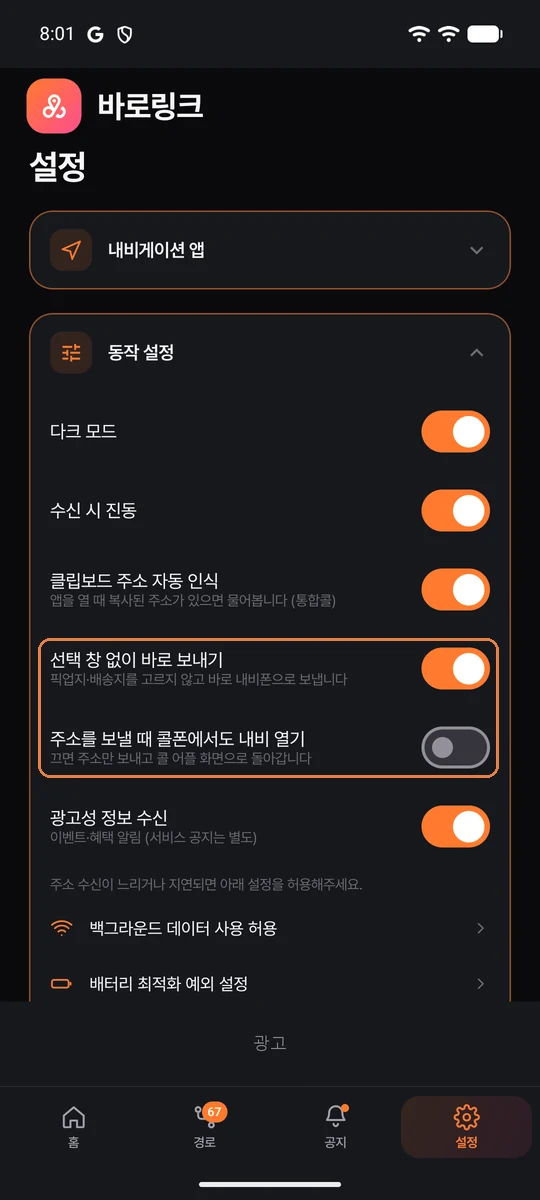
Here, the “selection window” means BaroLink's 어떤 지점인가요? (Which point is this?) window. The app chooser that appears the first time (BaroLink → Always) works the same as before.
If you leave it as is
- Tap the location or directions button in your call app It is the same button you always tap to open navigation.
- The first time only, pick BaroLink → Always in the app chooser Same as before. Once you tap 항상 (Always), this window no longer appears. The window and the button names may look a little different on some phone models.
- You're done when 주소 전송 중... (Sending address...) shows for a moment BaroLink sends the address straight to the navi phone without the selection window. The call phone stays on the call app screen.
- The address appears in the navi phone's route list It is marked 목적지 (Destination). No Pickup or Drop-off label is added.
When you want to choose Pickup or Drop-off
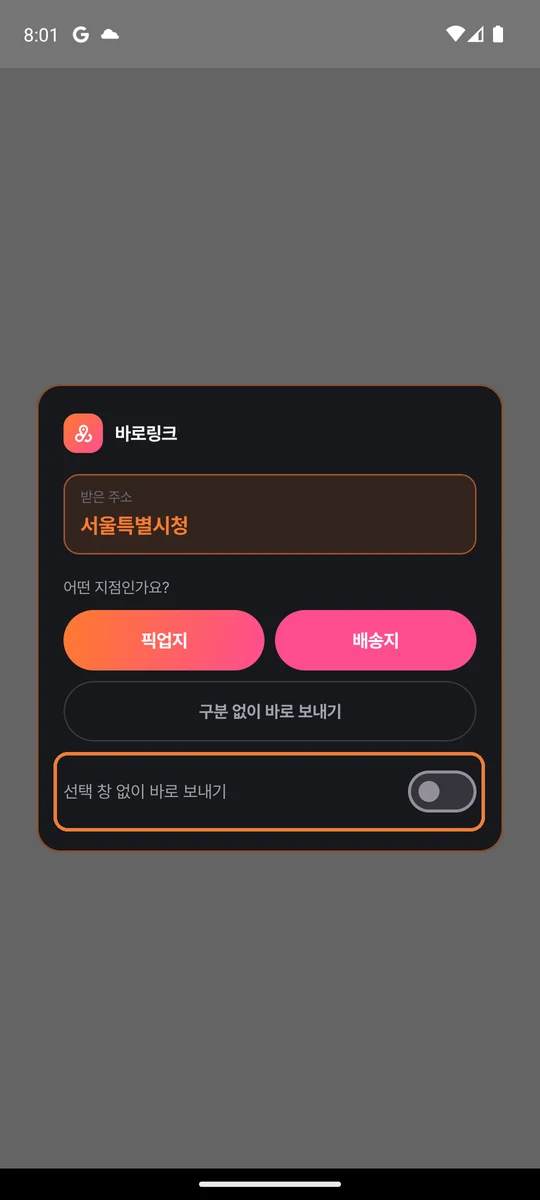
On the call phone, turn off 설정 → 동작 설정 → 선택 창 없이 바로 보내기 (Settings → Behavior → Send right away without the selection window). Then the 어떤 지점인가요? (Which point is this?) window appears every time you send, as before.
- 받은 주소 (Received address) — The address or place name passed from your call app. Check it first.
- 픽업지 (Pickup) · 배송지 (Drop-off) — Tap one to send the address with that label.
- The third button — Sends without a label. Normally it reads 구분 없이 바로 보내기 (Send now without choosing). If 주소를 보낼 때 콜폰에서도 내비 열기 (Also open navigation on the call phone when sending) is on and the navigation app chosen in BaroLink settings is installed on the call phone, it reads 구분 없이 내비 바로 실행 (Open navigation now without choosing).
Turning it back on from the window
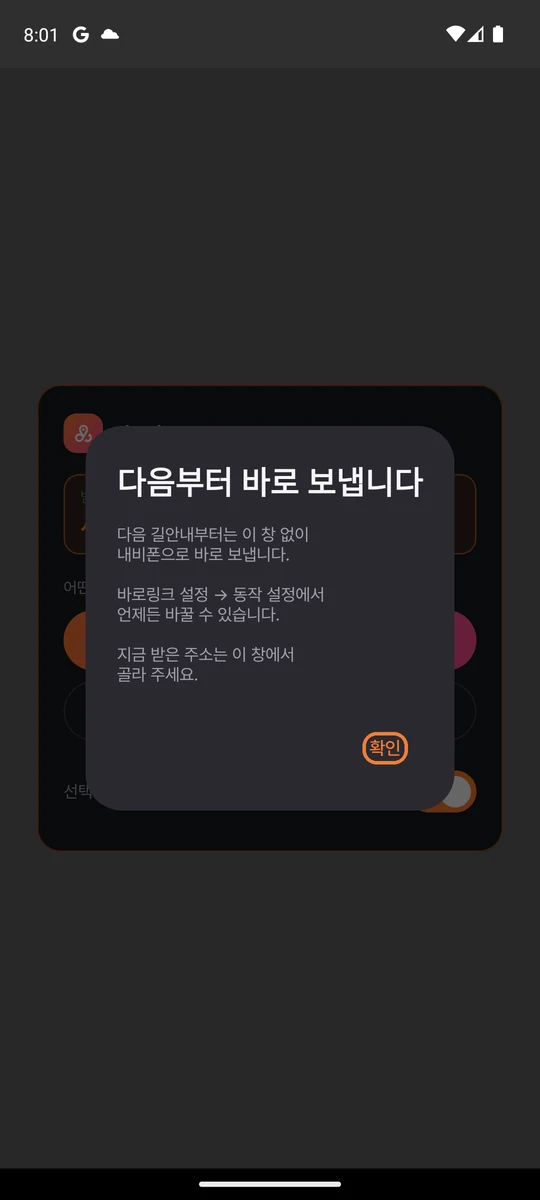
At the bottom of the 어떤 지점인가요? (Which point is this?) window, there is a switch with the same name as the one in Settings, 선택 창 없이 바로 보내기 (Send right away without the selection window). It is off whenever this window appears. When you turn it on, a notice window titled 다음부터 바로 보냅니다 (Sending right away from next time) appears. Tap 확인 (OK).
- From the next time you tap the location or directions button, BaroLink sends straight to the navi phone without this window.
- For the address you just received, you still need to choose in this window. Turning on the switch does not send the current address.
- You can change it back at any time in BaroLink 설정 → 동작 설정 (Settings → Behavior).
When you want navigation to open on the call phone too
To have navigation open on the call phone after sending, as before, turn on 설정 → 동작 설정 → 주소를 보낼 때 콜폰에서도 내비 열기 (Settings → Behavior → Also open navigation on the call phone when sending) on the call phone.
- After sending, the navigation app you chose in 설정 → 내비게이션 앱 (Settings → Navigation app) also opens to that destination on the call phone.
- If that navigation app is not installed on the call phone, nothing opens. No store window and no message appear. The address still goes to the navi phone.
- For apps that pass only the address text, like GoGoX, navigation does not open on the call phone even when this switch is on (same as before). The third button in the 어떤 지점인가요? (Which point is this?) window always reads 구분 없이 바로 보내기 (Send now without choosing).
The store window no longer appears
Up to 1.2.8, a ONE store, Galaxy Store or Google Play window appeared when the navigation app set in BaroLink was not on the call phone. From 1.2.9, BaroLink does not open a store window on the call phone when it sends an address from your call app.
If a store window still appears right away, your call app opened it. It appears because the call phone doesn't have the map app your call app opens. This means the address was not sent to the navi phone. Install the map app your call app uses (for example, KakaoMap or Naver Map) on the call phone, and next time pick BaroLink → Always in the app chooser. For Baemin Connect, see the Baemin Connect guide.
If you sent an address with no internet connection
You don't need to send it again. The address is kept on the call phone and goes to the navi phone by itself once the call phone is back online. If BaroLink was closed in the meantime, the address is sent the next time BaroLink starts (for example, the next time you tap the location or directions button).
If you send it again, the same address may be added twice on the navi phone. If it was added twice, delete one with the × on the 경로 (Route) tab.
What hasn't changed
- Navi phone — Works as before. These two settings don't affect it.
- Phones with no role chosen — These two settings don't apply. The 어떤 지점인가요? (Which point is this?) window appears as before, with no switch at the bottom, and navigation opens after sending. To use the phone as the call phone, tap 콜폰 (Call phone) on the Home tab.
- Auto-navigate on new address — Works as before.
- Sending a copied address, as with Tonghap Call — You choose Pickup · Drop-off · Destination, as before.
- Typing an address — You choose Pickup · Drop-off · Destination, as before.
FAQ
I want to use it the old way.
On the call phone, in 설정 → 동작 설정 (Settings → Behavior), turn off 선택 창 없이 바로 보내기 (Send right away without the selection window) and turn on 주소를 보낼 때 콜폰에서도 내비 열기 (Also open navigation on the call phone when sending). The 어떤 지점인가요? (Which point is this?) window appears every time you send, and navigation also opens on the call phone after sending (when that navigation app is installed on the call phone).
I can't see the switches on my navi phone.
That's normal. The two switches appear only on a phone used as the call phone. The navi phone works the same as before.
Free · Android