
Home › User manual › New Route tab
New Route tab · Trash · Favorites
From BaroLink 1.2.11, deleted addresses are kept in Trash for 30 days so you can restore them, and once you pin a place to Favorites, one tap starts navigation.
The screenshots on this page show the Korean screen. If your app is set to English (Settings → Language), the buttons have the English names used below.
Three tabs at the bottom of the Route tab
At the bottom of the Route tab, under the Start navigation for the full route button, there are three tabs: Addresses · Favorites · Trash. The number next to each name is how many items it holds. Your address list is still in the Addresses tab.
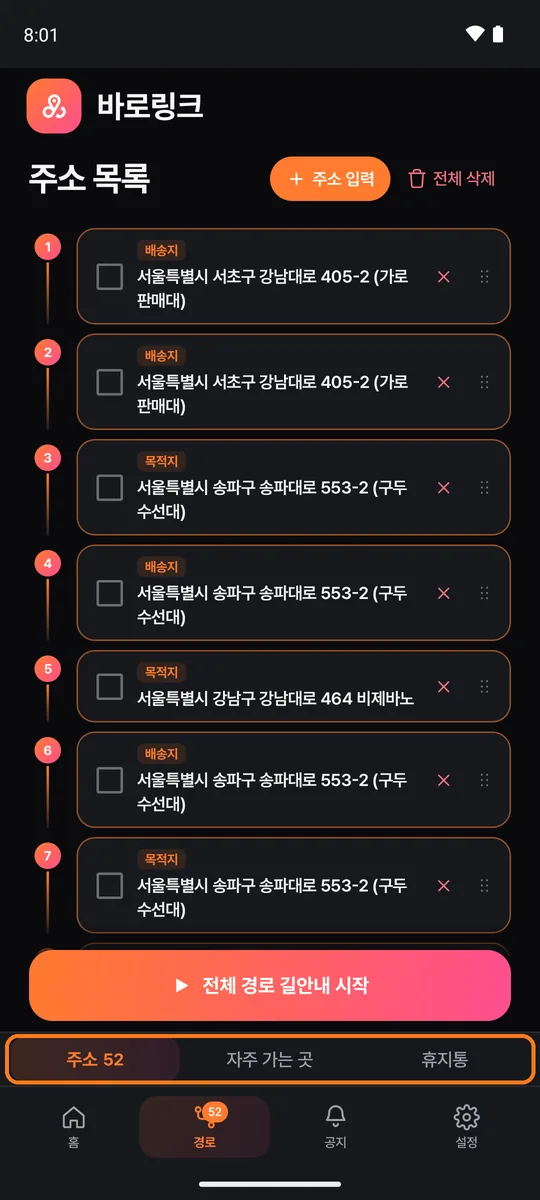
On the navi phone, an “Auto-nav” switch sits at the right end of the tab row. The Auto-navigate on new address switch, which was above the address list up to 1.2.10, has moved here. Turning it on works the same way.
Deleting moves it to Trash · Undo right away
Tap the × on the right of an address and it moves to Trash. “Moved the address to Trash” appears at the bottom for a moment — tap Undo then and it goes straight back.
Delete all at the top now also moves addresses to Trash. Tap Delete all in the “Delete all addresses?” window, and the deleted addresses go into Trash as one group.
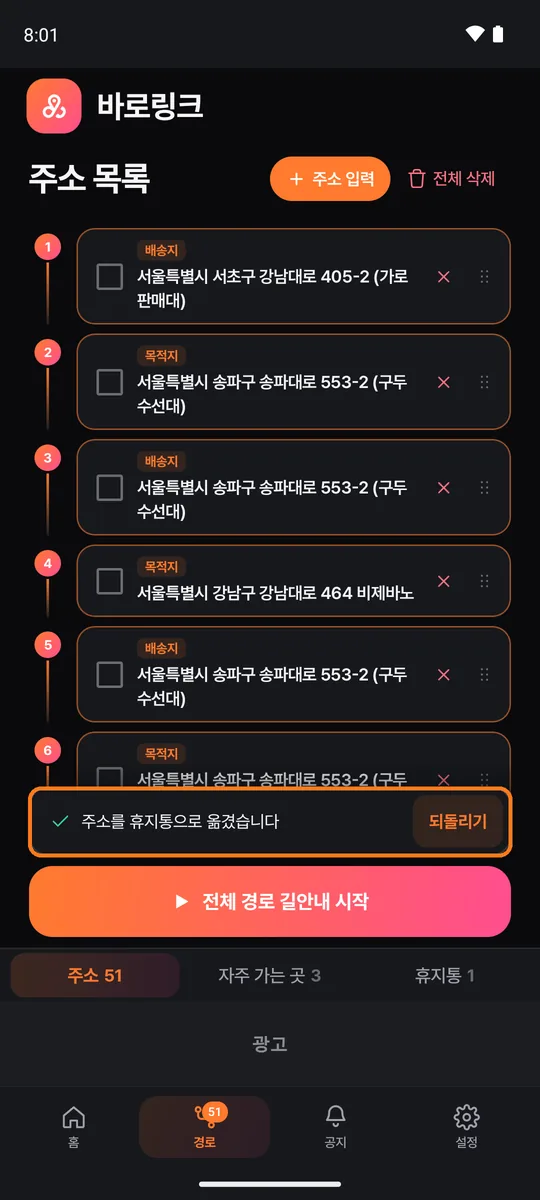
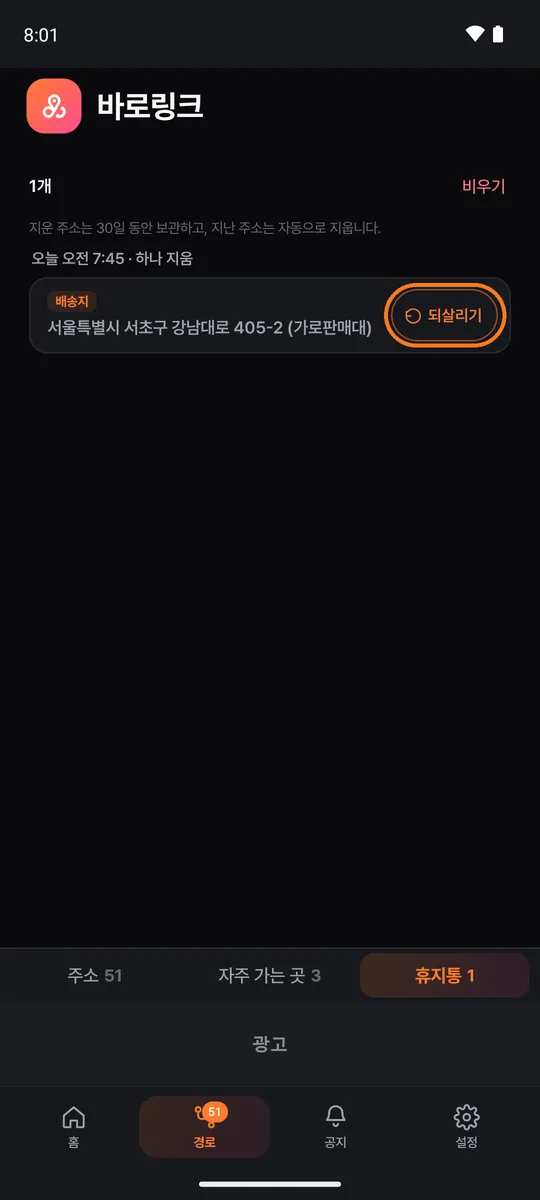
Restore from Trash
- Addresses are grouped by when they were deleted, for example “Today 7:45 AM · Deleted one” or “Deleted all (12)”.
- Tap Restore on an address to put it back in the Addresses tab. A group of several addresses deleted together, such as with Delete all, can be put back at once with Restore all.
- Deleted addresses are kept for 30 days, then deleted automatically.
- Empty at the top right deletes everything in Trash permanently. Addresses you empty can't be restored.
- Trash and Favorites are saved to your account, so the call phone and the navi phone see the same ones.
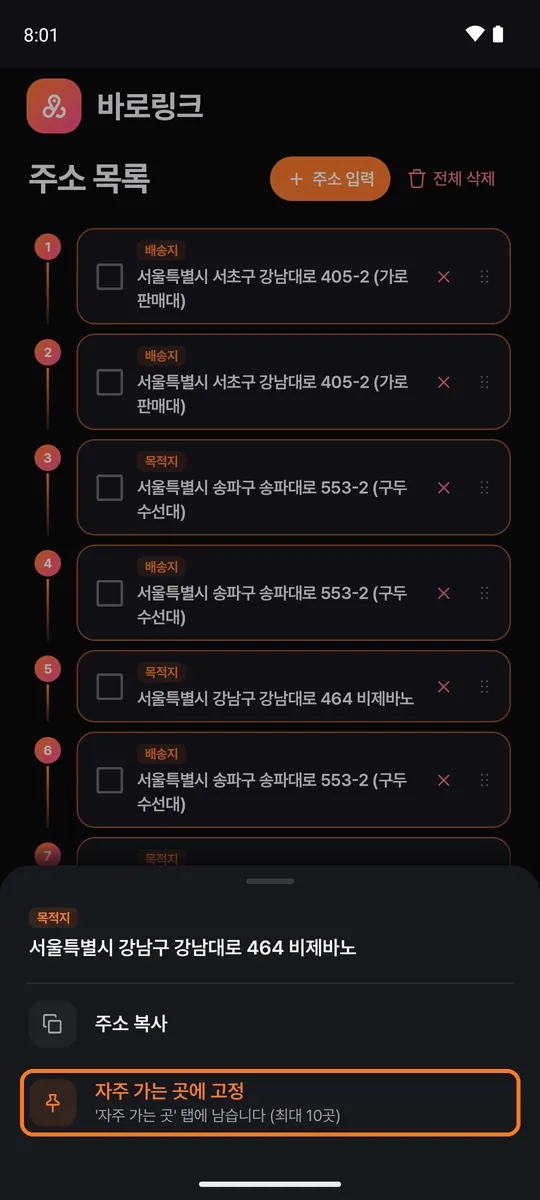
Pin a place to Favorites
- Long-press an address in the Addresses tab A menu slides up from the bottom. A long press used to copy the address right away; now you copy it with Copy address in this menu.
- Tap “Pin to Favorites” If the address is already pinned, Unpin appears here instead. An address that is still being checked can't be pinned.
- Set a name and tap “Pin” The place name is filled in if there is one; otherwise the end of the address (for example 464 비제바노). You can change it, up to 12 characters.
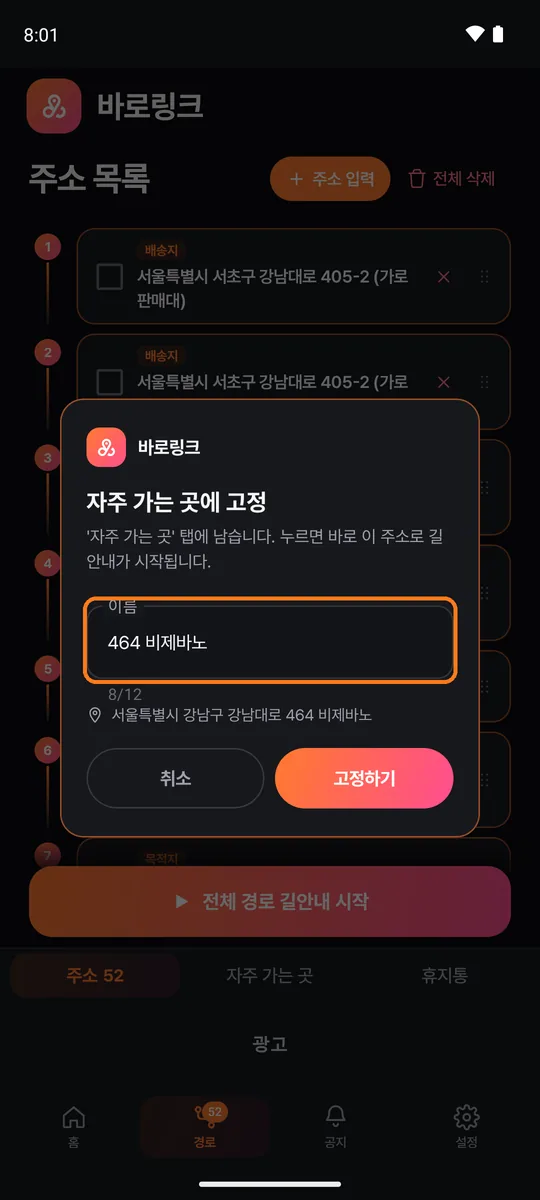
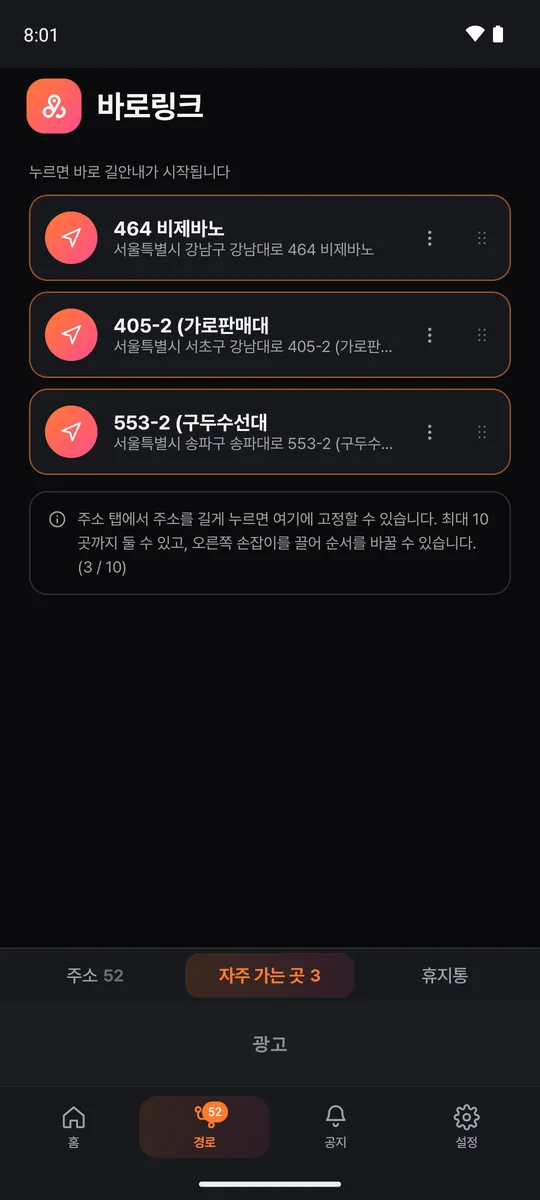
Using Favorites
- Tap to start navigation — On that phone, the navigation app chosen in Settings → Navigation app opens to that address right away. It is not sent to another phone. If the lot or building number of the address wasn't confirmed, a check window appears once before it opens.
- Reorder — Drag the handle (six dots) on the right.
- ⋮ menu — Rename · Unpin. Unpinning doesn't touch the address in the Addresses tab.
- You can keep up to 10 places. When it's full, unpin one first.
- Pinned places are saved separately from the Addresses tab. Deleting the address in the Addresses tab doesn't remove it from Favorites.
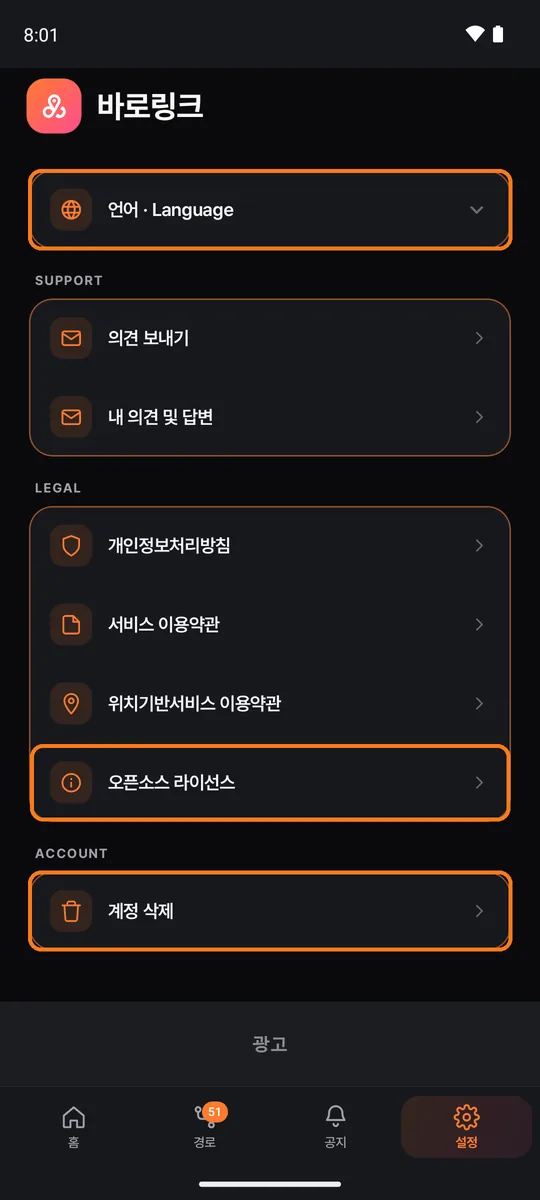
New in Settings
- 언어 · Language — At the top. Choose 한국어 (Korean) · English · System default. The app's screens switch to that language.
- Open source licenses — Under LEGAL. Shows the open source software BaroLink uses and the full license texts.
- Delete account — Under ACCOUNT. Please read the notes below before you tap it.
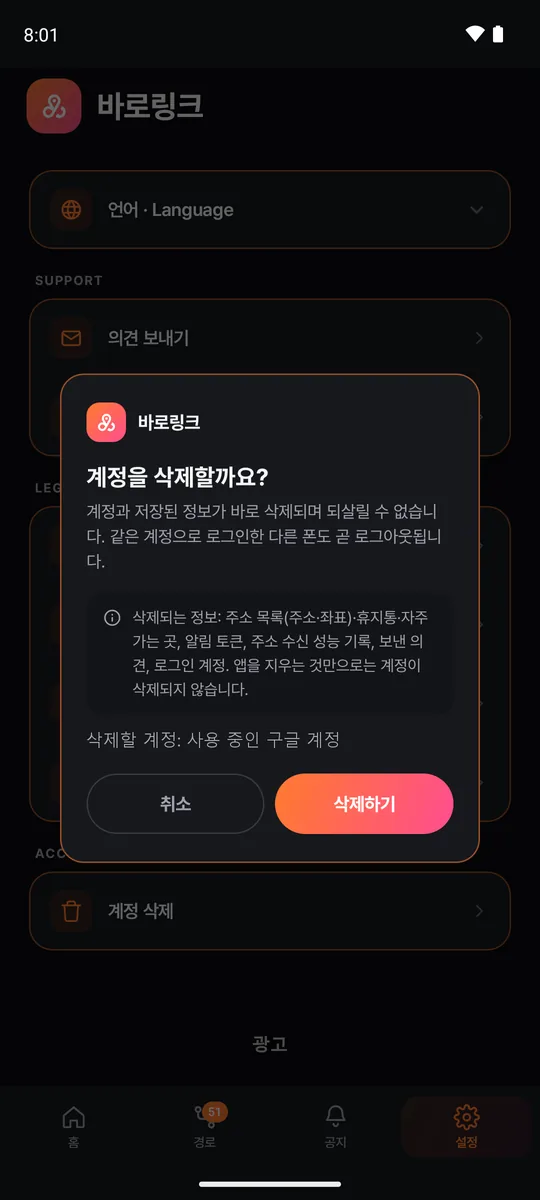
A deleted account can't be restored. When you tap Delete, the address list (addresses and coordinates), Trash, Favorites, notification tokens, address-receiving performance records, feedback you sent and your sign-in account are deleted right away, and other phones signed in to the same account are signed out shortly. Check the Account to delete shown in the window first.
Uninstalling the app alone does not delete your account. If deletion fails, for example because of an internet problem, you can use Request by email in the window.
FAQ
I emptied Trash. Can I get the addresses back?
No. Empty deletes them permanently, so they can't be restored. The same goes for addresses deleted automatically after 30 days.
Long-press doesn't copy the address any more.
A long press now opens a menu. Tap Copy address at the top of the menu.
Does tapping a Favorite send it to the navi phone?
No. Navigation opens on the phone you tapped. Tap it on the navi phone and the navi phone's navigation app opens; tap it on the call phone and the call phone's opens (when that app is installed).
Free · Android